Is Distance Learning Worth It? New TechWhirl Article

Do you think that one day you may end up taking an online distance learning course instead of attending traditional classroom?

Is Distance Learning Worth It?

Distance learning allows you a lot of flexibility, but is it worth the time and effort?

The wonderful folks at TechWhirl published my article which I ask and answer the question: Is Distance Learning Worth It? My article delves into some history regarding distance learning in technical communication and includes insight from colleagues who have had varying experience with this method of instruction to advance their careers.

I also found a nugget of information from STC Conference Proceedings published in 1996 which defined an early version of distance learning nearly 15 years ago and how (at that time) was only the beginning.

Please check out my article on TechWhirl: Professional Development in TechComm: Is Distance Learning Worth It?

More articles I’ve written for TechWhirl: http://techwhirl.com/author/rogerrenteria

Also, before you take your time to read my article, I wanted to let a couple of readers know my status on attending LavaCon 2012: See you in Portland!


Evolution of a website – Part 4 of 4

Note: this is a four-part series which I discuss the first two versions of the website pre-WordPress, the third and fourth versions of the site using WordPress, implementation of the fourth version using WordPress and its intricacies, and lastly how to keep the site alive.

Part 4

Maintaining the site and keeping content fresh

While we moved houses and unpacked, the tricky part was to keep the content relevant and fresh. The problem with static websites and why they suffer is because content updated infrequently. It can be a time-consuming task being webmaster, but with WordPress, the task of updating the site can be delegated to a team. Instead of having a webmaster as a bottleneck for updating information, contributors can use the self-service interface and update the website themselves.

I love being a webmaster of website that will take little effort to update or add content. WordPress offers that convenience for a small price: the time to learn and familiarize oneself with the software and associated plug-ins.

I am truly satisfied how the final product came out. While the website is one step closer to having a fully functional chapter, it is definitely a start to communicate with members and represent the community. Many thanks go out to the previous webmasters who contributed their efforts on the website. I also want to thank my colleagues who helped with site content with their suggestions and advice–without their availability, this site would be stuck in a black hole.

Is the Future in Social Media?

The next step in moving forward is to promote the Kachina Chapter through our social media channels. What is great about the latest design is that there are social media links at the top of the website which direct visitors and members to view our site on LinkedIn, Facebook, and Twitter. I hope that we can use these tools to communicate with current members and recruit new individuals who may be interested in the field of technical communication. So far, this is only the beginning!

Conclusion

Websites take some interesting paths to get to where they are now. In this case, I believe the STC New Mexico Kachina website is at its best since it was originally created. While I understand that different technologies are working together to display the site in its current state, to most people this implementation may seem complicated on the back-end, but it was meant to make updates easier and have greater accessibility on the internet. The point I want to make is, while the current site took a tremendous amount of effort to implement, it is the best version that utilizes previous design cues, color schemes, and content. Now it should be easier to maintain and faster to update and change without having to use a WYSIWYG editor. All that future web masters can do is log into a web interface and update the site with ease.

Evolution of a website – Part 3 of 4

Note: this is a four-part series which I discuss the first two versions of the website pre-WordPress, the third and fourth versions of the site using WordPress, implementation of the fourth version using WordPress and its intricacies, and lastly how to keep the site alive.

Part 3

Implementation

Before I made the switch to utilize WordPress fully, I did some housekeeping before moving everything over. The hosting services at the time were okay for our needs, but we needed much more control over our webspace, email systems, and mailing list–something our previous hosting company could not provide without our chapter feeding them more money (I won’t even get into details how much money we were being ripped off, I peg the figure at being overcharged about 200%). Before moving the STC Kachina website over, I had to package up the site and mySQL database, upload all site files in their place, and modify DNS settings to point to the new hosting company.

Packing the fine China–in this case our website

I made sure everything was in place when we made the move so nothing would break and everything would continue operating as if we flipped a switch and the lights stayed on. As a professional chapter, we could not afford downtime in any form of interrupted services. Before making the website design change, I tested custom site designs and layouts on a test server before implementing it our final product. I also set up our email system and downloaded all the email we had from our previous hosting company. Once it was complete, I could cut the links from our old hosting company and send out a final message summarizing the new changes to the mailing list.

Moving the house does break things–even when done carefully

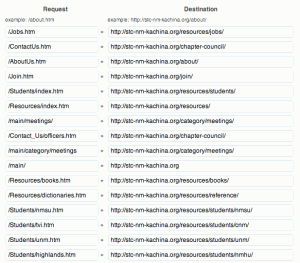
Among the changes we had, such as site organization, I used HTTP 301 Redirects. The current convention for websites is to use simple easy to read URLs. These links consist of lowercase characters, dashes instead of spaces, and human readable text.

For example: http://www.stc-nm-kachina.org/ContactUs.html directed visitors to the Chapter Council contact page, but http://stc-nm-kachina.org/chapter-council is a more appropriate and better URL.

The issue I saw by changing the naming convention and organization of web pages is encountering HTTP 404 Page Not Found errors or countless broken links. What I did was implement 301 Redirects to dictate to the server that if anyone goes to “ContactUs.html” to permanently redirect the user to “chapter-council”. 301 Redirects is a nifty way to fix potential problems until most visitors get accustomed to the new site. There are about thirty redirects which point users to the right pages.

STC NM Kachina - 301 Redirects

STC NM Kachina – 301 Redirects