RT, #ff, MT – WTH (what the heck) does it all mean?

On Twitter, you have up to 140 characters to shout-out your message. Space is limited per tweet and even more on a retweet. (What’s a retweet? See below.) This social network is special because you have to master the art of succinct messages that are comprehensible for the rest of the world. Below is a short guide for beginners to help decipher the Twitterverse.

Anatomy of a Tweet

Tweets are 140 characters and may contain Twitter handles (usernames preceded with @), hash tags, lingo, and short language. Hash tags are topics that contain the # character in front of a word, like #techcomm. #techcomm signifies the topic of technical communication. Topics are abundant, for example you can find tweets that include #cats, #dogs, or whatever you prefer.


The following examples include a tweet, a retweet, and a reply utilizing a a retweet.

The Tweet

The original tweet is what you read from someone who posted on Twitter.

Roger Renteria's Tweet

Roger Renteria's tweet


Retweeting someone’s tweet

A retweet is a reply to a person’s original post with RT appended at the front.

Roger Renteria's Retweet

Roger Renteria's retweet


Retweet with a reply to another user

In this case, the retweet is the same as the previous example, except I have added a short message in front of the RT.

Roger Renteria's Reply Retweet

Roger Renteria's retweet with a reply.


Twitter lingo

On Twitter, there is some lingo to learn so you can understand the language tweeters use on a regular basis:

  • RT – retweet (used to share someone’s tweet)
  • MT – modified tweet (used to shorten original tweets when retweeting)
  • #ff – Friday follow (used on Fridays to list Twitter users you want your followers to check out)
  • d @username – send direct message (used for private messaging)
  • DM @username – send direct message (used for private messaging)
  • CC – carbon copy mention (used to mention another user in relation to a public tweet)

Say it shorter

With a 140-character limit, including spaces, tweets are like text messages, and we can’t be too wordy. Here are some commonly used abbreviations:

  • w/ – with
  • w/out – without
  • & – and
  • RE – regarding
  • b/c – because
  • r – are
  • u – you
  • LOL – laughing out loud

Use abbreviations when possible if followers can understand them. You can use short language when necessary, but keep it professional. “I dn’t wnt to see ur twts like this b/c it is not a gr8 example 4 for reading.” I can read your message, but most likely, I would ignore it.

Use some punctuation!

Twitter is even better if punctuation is involved! Your tweets can be professional as well as grammatically correct. Don’t be afraid of nearly maxing out the 140 characters.

Shortlinks: bit.ly, t.co, fb.me, goo.gl

Link shorteners are awesome, but are you clicking a trusted link?

Some companies offer short link services so your tweets and links fit within the 140 character limit. To ensure that you are clicking on a link that won’t take you to a malicious site, check out these shortlink expanders on the web or as a browser add-on.

Like you would with email, ensure the link comes from a trusted source and beware before you click! By checking with a shortlink expander, you can see the full web address before clicking, and it ensures you are going to legitimate website instead of a spam site that may compromise your computer.


Want to learn more?

Mashable has a comprehensive guide on Twitter:
http://mashable.com/guidebook/twitter/

Paul McFedries wrote “Twitter: Tips, Tricks, and Tweets,” a great primer to using Twitter:
http://www.amazon.com/Twitter-Tips-Tricks-Tweets-McFedries/dp/0470529695

Twitter has pages of how to use Twitter:
https://support.twitter.com/groups/31-twitter-basics


If you have any questions, tweet me! @RogerRenteria.

One Year Anniversary

I cannot believe it was a year and a few days ago that I came up with the idea to write a blog about my views and interests in the field of technical communication. My first post, Post-STC 2011 Summit, started the journey in which I subsequently discussed QR Codes, Google+, Facebook, MySpace, Professional UsernamesTechWhirl, and many more topics.

To give you an idea of what has been going on behind the scenes, I will share with you some of the numbers from WordPress and Google Analytics since I began this blog and website. Enjoy the data!

The Raw Statistics

(Includes everything, including my own visits)

  • 1621 Visits
  • 956 Unique Visitors
  •  4671 Page Views
  • 58.42% Bounce Rate (single-page visits or visits that resulted in leaving the landing page)
  • 58.67% New Visits

Top Five States With Most Visitors

(excluding New Mexico)

  1. Texas
  2. California
  3. Illinois
  4. New York
  5. Massachusetts

Top Nine U.S. Cities With Most Visitors

(excluding Albuquerque, NM)

  1. Chicago, IL
  2. Austin, TX
  3. Minneapolis, MN
  4. Espanola, NM
  5. Santa Fe, NM
  6. New York, NY
  7. Los Angeles, CA
  8. Springfield, MO
  9. Dallas, TX

Top Five Countries With Longest Average Visit Duration

(excluding the United States)

  1. New Zealand (9:08 min)
  2. Antigua and Barbuda (2:00 min)
  3. Latvia (1:32 min)
  4. Singapore (1:25 min)
  5. India (1:08 min)

This is a small sampling of the data I collected. There is much more insight, such as types of internet browser, versions of operating system, type of internet service provider used to visit the site, etc.

Basically, when I looked at the data, I saw that I had the most readers from the United States and several from around the world. Visitors came in all forms, using Windows XP, Vista, or 7 or Mac OS X; Firefox, Chrome, or Internet Explorer; and iPhones, iPads, or Android tablets. Of visitors viewing the site, about 31% used a 1280 x 800 screen resolution, 11% used a 1680 x 1050 resolution, 9% used 1366 x 768 resolution, and the remaining used a mix of other screen resolutions.

These sorts of data can be very useful when deciding how to design websites for specific audiences and what kind of browsers and devices I should consider when building sites. I am a data geek, so it is really neat to look into the numbers and capture a glimpse of who my audience is.

I analyzed more of the data, and I have some goals that I want to accomplish in the next year:

  1. Increase Average Visit Duration
  2. Reduce Bounce Rate
  3. Increase Returning Visitors
  4. Increase Website Referrals
  5. Reduce Site Drop Offs
  6. Increase Post Comments

Think it can be done? Anything is possible. I will share more blog entries on my social networks in hopes colleagues will read them. Also, I will research more Search Engine Optimization (SEO) techniques so visitors can find my site easily using Google, Bing, or Yahoo.

I really look forward to comparing this year’s data to next year’s and see the differences.

STC 2012 Summit Experience

Roger at Cloud Gate

Roger at Cloud Gate (scroll down for more photos)

I had a wonderful time at the STC 2012 Summit in Chicago. This year was extremely fun. Looking back at my pre-Summit blog post, I believe I successfully accomplished my four original goals: network, learn new trends, take and copious notes, and enjoy the city.

Goal: Network, Network, Network

Result: Success

I networked a lot. I love to meet other technical communicators throughout the conference. There were a lot of familiar faces, and there were plenty of new faces, as well. It was a pleasure meeting and greeting various folks throughout the Summit, and I genuinely hope that these connections last throughout the year until my next conference—whether it is LavaCon 2012 or the 2013 STC Summit.

Goal: Learn New Trends

Result: Success

The educational sessions and leadership meetings were extremely beneficial. I know that I am still learning and will always continue to learn. This mantra will serve me well for future endeavors, because I strive to seek new knowledge at every opportunity.

To sum up what I took away from the conference, I learned how to

  • improve my online professional presence,
  • spruce up websites with web-friendly fonts,
  • leverage my professional network for future employment opportunities,
  • maintain a professional portfolio, and
  • craft an action plan for reviving my local STC Chapter.

I learned other things as well, but I will discuss them in detail in a subsequent blog entry after I’ve had a chance to review my notes.

Goal: Take Notes

Result: Not yet determined

I took plenty of notes, but I’m not ready to share my opinion whether it was successful. These notes will be a valuable resource when I decipher my shorthand and scribbles. I also took notes on my computer, and I’m ready to write some responses to the seminars and what I learned from them.

Goal: Enjoy the City

Result: Hugely successful

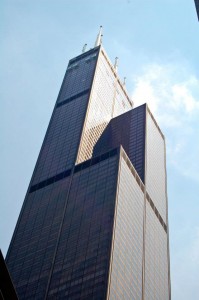
Sears Tower

Sears Tower

This goal was absolutely fulfilled. Check out the photos of my adventures in Chicago. During previous conferences, I spent plenty of time at the educational sessions. Like any good conference-going individual, I wanted to get the most out of the conference because it is a valuable experience. But this the balance between enjoying this mini-vacation and attending sessions at a professional level was excellent.

Chicago at Sunset

Chicago at Sunset

Note: I paid for this entire trip myself, including conference fees, airfare, accommodations, and food. I also took annual leave from my current position to attend this summit. My goal for next year is to convince my supervisor to allow the company to fund a Summit trip or any conference trip. I will explain the value of attending professional development seminars.

Deep Dish Pizza at Lou Malnati's

Deep Dish Pizza at Lou Malnati's

While visiting Chicago, I saw the best attractions: Sears Tower, Buckingham Fountain, Cloud Gate, Navy Pier, and Wrigley Field. I also enjoyed eating authentic Chicago deep-dish pizza, saw Frank Lloyd Wright’s house, and rode the “L” train through various suburbs.

Navy Pier Ferris Wheel

Navy Pier Ferris Wheel

Despite the fears of the NATO Summit, I felt extremely safe throughout the entire visit in Chicago. Keep in mind that Chicago is a huge city, and what happens downtown may not affect suburbs. I am thankful that I avoided the protests and was able to enjoy visiting popular attractions without issues.

Last Thoughts

In conclusion, I had a great time at the Summit and am planning my next conference. I have been encouraged to attend the LavaCon Conference in Portland later this year. I will make my best effort to attend.  Some of my colleagues are planning for the 2013 STC Summit, which will be in Atlanta. I plan to attend that Summit because it is the 60th Anniversary of the Society for Technical Communication, and I am on a committee to assist with the celebrations.

If you wish to stay in contact with me, please leave a message on this entry or message me via Twitter, LinkedIn, Facebook, or Google+. I wish I could have spent more time with colleagues, but I intend to stay in touch with everyone I met this year. I hope you enjoyed the conference as much as I did, and I look forward to seeing you next year!

I will post more about the Summit later this week and next.